- Messages
- 2
- Réactions
- 4
- Points
- 0
Hello la communauté!
Je reviens vous donner des nouvelles de mes essais avec les relais. C'est hyper concluant, je suis carrément satisfait! L'installation est câblée et en test depuis un bon mois, la mise en route de mon brumisateur ainsi que la vitesse de mon extracteur sont sous le contrôle de l'ESP. Le système dépasse mes attentes, c'est génial! /emoticons/default_yeah.gif" title="" />
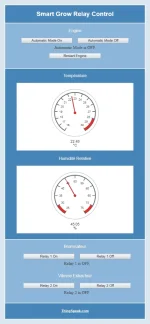
J'ai suivi tes conseils Raphiki, désormais l'ESP héberge la page web permettant de contrôler le système. L'accès au serveur web peut se faire depuis n'importe quelle connexion, il est sécurisé de façon sommaire par identification/mot de passe.
Pour la gestion des relais, il est possible d'agir manuellement, ou alors on peut enclencher un mode automatique qui ajustera l'état des relais en fonction des seuils de température et d’humidité définis dans le code.
Je me suis aperçu que l'ESP avait tendance a redémarrer assez souvent. Dans le code de base, le système redémarre si les datas ne sont pas reçues par thingspeak. En fait, c'est très souvent le cas, cela peut aussi être à cause de micro-coupures de connexion internet auxquelles Free m'a habitué...
Bref, ça me posait problème car je ne veux pas que l'ESP se mette à commuter mes relais de façon frénétique à cause de redémarrages intempestifs. ^^
J'ai modifié le code en ajoutant un compteur de fail que j'ai incrémenté jusqu'à ne plus avoir de redémarrages inutiles. Désormais le système ne redémarre qu'après dix messages consécutifs non reçus par thingspeak.
Le système démarre en mode manuel avec les relais OFF, de cette façon je n'ai pas de risque de faire jouer des claquettes à mon extra et brumisateur suite à des soucis de réseau.
D'autre part, j'ai ajouté dans le code une alerte envoyée directement à telegram à chaque démarrage du système. Pour cela j'ai utilisé cette librairie : https://github.com/Gianbacchio/ESP8266-TelegramBot
J'ai aussi mis en place un "No Data Check" dans les React thingspeak. Avec tout ça, le système est vraiment sous contrôle c'est au top!
En image :
Voici le code sur lequel je me suis arrêté. J'ai essayé d'être au plus clair possible mais comme je n'y connais rien c'est pas facile! Il vous faudra remplacer les XXXXXXX par vos divers identifiants.
Un document qui m'a bien aidé :http://www.esploradores.com/wp-content/uploads/2018/04/A-Beginners-Guide-to-the-ESP8266-1.pdf
Au sujet de la calibration des sondes, dans le code à cet endroit (en rouge ici par exemple) on peut ajouter un coefficient ou une valeur d'offset. Cela m'a permis de réaligner les sondes par rapport à mon thermomètre/hygromètre mécanique de référence. /emoticons/default_wink.png" srcset="/emoticons/[email protected] 2x" title="" width="20" />
if (cptLoop >= CPT_PUBLISH) {
temperature = temperature / cptTemperature - 1.6;
humidity = humidity / cptHumidity / 1.1;
moisture = moisture / cptMoisture;
light = light / cptLight;
Voilà, je trouve ce petit système génial. C'est simple à mettre en oeuvre et vraiment efficace. Merci encore Raphiki, je n'aurais jamais pu réaliser cette installation sans ton aide! /emoticons/default_supair.gif" title="" />
Si vous voulez jeter un oeil, c'est ici :
https://thingspeak.com/channels/580336
Bon grow connecté 2.0 à tous!
Je reviens vous donner des nouvelles de mes essais avec les relais. C'est hyper concluant, je suis carrément satisfait! L'installation est câblée et en test depuis un bon mois, la mise en route de mon brumisateur ainsi que la vitesse de mon extracteur sont sous le contrôle de l'ESP. Le système dépasse mes attentes, c'est génial!
/emoticons/default_yeah.gif" title="" />J'ai suivi tes conseils Raphiki, désormais l'ESP héberge la page web permettant de contrôler le système. L'accès au serveur web peut se faire depuis n'importe quelle connexion, il est sécurisé de façon sommaire par identification/mot de passe.
Pour la gestion des relais, il est possible d'agir manuellement, ou alors on peut enclencher un mode automatique qui ajustera l'état des relais en fonction des seuils de température et d’humidité définis dans le code.
Je me suis aperçu que l'ESP avait tendance a redémarrer assez souvent. Dans le code de base, le système redémarre si les datas ne sont pas reçues par thingspeak. En fait, c'est très souvent le cas, cela peut aussi être à cause de micro-coupures de connexion internet auxquelles Free m'a habitué...
Bref, ça me posait problème car je ne veux pas que l'ESP se mette à commuter mes relais de façon frénétique à cause de redémarrages intempestifs. ^^
J'ai modifié le code en ajoutant un compteur de fail que j'ai incrémenté jusqu'à ne plus avoir de redémarrages inutiles. Désormais le système ne redémarre qu'après dix messages consécutifs non reçus par thingspeak.
Le système démarre en mode manuel avec les relais OFF, de cette façon je n'ai pas de risque de faire jouer des claquettes à mon extra et brumisateur suite à des soucis de réseau.
D'autre part, j'ai ajouté dans le code une alerte envoyée directement à telegram à chaque démarrage du système. Pour cela j'ai utilisé cette librairie : https://github.com/Gianbacchio/ESP8266-TelegramBot
J'ai aussi mis en place un "No Data Check" dans les React thingspeak. Avec tout ça, le système est vraiment sous contrôle c'est au top!
En image :
L'ESP et ses sondes dans le placo :

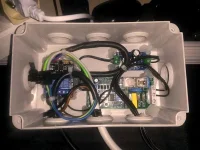
Le câblage des relais. Il y a aussi un relais timer pour l'alimentation du brumisateur. Cela me permet de le faire fonctionner par cycle de trois minutes ON, trois minutes OFF, réglage adapté par rapport à la taille de mon placo et à l'extraction.
https://www.velleman.eu/products/view/?id=341552
Screenshot de l'interface web :
Le câblage des relais. Il y a aussi un relais timer pour l'alimentation du brumisateur. Cela me permet de le faire fonctionner par cycle de trois minutes ON, trois minutes OFF, réglage adapté par rapport à la taille de mon placo et à l'extraction.
https://www.velleman.eu/products/view/?id=341552
Screenshot de l'interface web :
Voici le code sur lequel je me suis arrêté. J'ai essayé d'être au plus clair possible mais comme je n'y connais rien c'est pas facile! Il vous faudra remplacer les XXXXXXX par vos divers identifiants.
Un document qui m'a bien aidé :http://www.esploradores.com/wp-content/uploads/2018/04/A-Beginners-Guide-to-the-ESP8266-1.pdf
/*
* ESP8266 NodeMCU SmartGrow
*/
#include "DHT22.h"
#include "YL100.h"
#include "MAX44009.h"
#include <ESP8266HTTPClient.h>
#include <ESP8266WebServer.h>
#include <ESP8266WiFi.h>
#include <WiFiClient.h>
#include <WiFiClientSecure.h>
#include <ESP8266TelegramBOT.h>
//---------------------------------------------------------------
//HTML webpage contents in program memory
const char MAIN_page[] PROGMEM = R"=====(
<!DOCTYPE html>
<html>
<head>
<meta charset="UTF-8">
<meta name="viewport" content="width=device-width, initial-scale=1.0"/>
<title>Smart Grow Relay Control</title>
</head>
<body align="center" style="width: 540px; margin: 0 auto; padding: 20px;" bgcolor="#d9e7f2">
<header style="border: 2px solid white; margin: -2px; background-color: #4685b9;">
<h2 style="font-family: Helvetica;color: white;">Smart Grow Relay Control</h2>
</header>
<div style="border: 2px solid white; margin: -2px; padding-top: 2px; background-color: #8cb6d9;">
<br>
<span style="font-family: Helvetica;color: white;">Engine</span><br>
<br>
<a href="AutomaticModeOn" target="Iframe1"><input type=button style="width: 198px;" value="Automatic Mode On" onClick="this.parentNode.click()"></a>
<a href="AutomaticModeOff" target="Iframe1"><input type=button style="width: 198px;" value="Automatic Mode Off" onClick="this.parentNode.click()"></a><br>
<iframe name="Iframe1" width="414" height="34" frameBorder="0"></iframe><br>
<a href="SystemRestart" target="Iframe2"><input type=button style="width: 200px;" value="Restart Engine" onClick="this.parentNode.click()"></a><br>
<iframe name="Iframe2" width="200" height="34" frameBorder="0"></iframe><br>
</div>
<div style="height: auto; border: 2px solid white; margin: -2px; background-color: #4685b9;">
<br>
<span style="font-family: Helvetica;color: white;">Température</span><br>
<br>
<iframe width="450" height="260" style="border: 1px solid #cccccc;" src="https://thingspeak.com/channels/580336/widgets/16629"></iframe><br>
<br>
<span style="font-family: Helvetica;color: white;">Humidité Relative</span><br>
<br>
<iframe width="450" height="260" style="border: 1px solid #cccccc;" src="https://thingspeak.com/channels/580336/widgets/16636"></iframe><br>
<br>
</div>
<div style="height: auto; border: 2px solid white; margin: -2px; background-color: #8cb6d9;">
<br>
<span style="font-family: Helvetica;color: white;">Brumisateur</span><br>
<br>
<a href="Relay1On" target="Iframe3"><input type=button style="width: 198px;" value="Relay 1 On" onClick="this.parentNode.click()"></a>
<a href="Relay1Off" target="Iframe3"><input type=button style="width: 198px;" value="Relay 1 Off" onClick="this.parentNode.click()"></a><br>
<iframe name="Iframe3" width="414" height="34" frameBorder="0"></iframe><br>
<br>
<span style="font-family: Helvetica;color: white;">Vitesse Extracteur</span><br>
<br>
<a href="Relay2On" target="Iframe4"><input type=button style="width: 198px;" value="Relay 2 On" onClick="this.parentNode.click()"></a>
<a href="Relay2Off" target="Iframe4"><input type=button style="width: 198px;" value="Relay 2 Off" onClick="this.parentNode.click()"></a><br>
<iframe name="Iframe4" width="414" height="34" frameBorder="0"></iframe><br>
<br>
</div>
<footer style="height: auto; border: 2px solid white; margin: -2px; background-color: #4685b9;">
<h5><a href="https://thingspeak.com/channels/580336" target="_blank" style="font-family: Helvetica;color: white;">ThingSpeak.com</a></h5>
</footer>
</body>
</html>
)=====";
//---------------------------------------------------------------
// WIFI SETTINGS
#define WIFI_SSID "XXXXXXXXXXXXXXXX"
#define WIFI_KEY "XXXXXXXXXXXXXXXX"
// THINGSPEAK SETTINGS
#define THINGSPEAK_HOST "api.thingspeak.com"
#define THINGSPEAK_API_KEY "XXXXXXXXXXXXXXXX"
#define FIELD_TEMPERATURE 1
#define FIELD_HUMIDITY 2
#define FIELD_MOISTURE 3
#define FIELD_LIGHT 4
#define FIELD_RELAY1 5
#define FIELD_RELAY2 6
// TELEGRAM SETTINGS
#define BOT_TOKEN "XXXXXXXXX:XXXXXXXXXXXXXXXXXXXXXXX_XXXXXXXXXXX"
#define CHAT_ID "-XXXXXXXXX"
#define BOT_NAME "XXXXXXXXXXXXXXXX"
#define USERNAME "XXXXXXXXXXXXXXXX"
// PIN SETTINGS
#define PIN_SCL D1
#define PIN_SDA D2
#define PIN_DHT D3
#define PIN_YL100 A0
// PROGRAM SETTINGS
#define TIME_SLEEP 1000
#define CPT_PUBLISH 26
// VAR DECLARATION
HTTPClient http;
ESP8266WebServer server(80);
WiFiClientSecure client;
TelegramBOT bot(BOT_TOKEN, BOT_NAME, USERNAME);
DHT dht(PIN_DHT, DHT22);
YL100 yl(PIN_YL100);
Max44009 max44(0x4A, PIN_SDA, PIN_SCL);
uint16_t cptLoop = 0;
uint16_t FailLoop = 0;
float temperature = 0;
float humidity = 0;
float moisture = 0;
float light = 0;
uint16_t relay_1 = 0;
uint16_t relay_2 = 0;
uint16_t cptTemperature = 0;
uint16_t cptHumidity = 0;
uint16_t cptMoisture = 0;
uint16_t cptLight = 0;
uint16_t AutomaticMode = 0;
int i = 0;
//===============================================================
// This routine is executed when you open its IP in browser
//===============================================================
void handleRoot() {
Serial.println("Web page requested.");
server.send(200, "text/html", "<form action=\"/SmartGrow\" method=\"POST\"><p>Smart Grow Relay Control</p><input type=\"text\" name=\"username\" placeholder=\"Username\"></br><input type=\"password\" name=\"password\" placeholder=\"Password\"></br></br><input type=\"submit\" value=\"Login\"></form>");
}
void handleSmartGrow() { // If a POST request is made to URI /SmartGrow
if ( ! server.hasArg("username") || ! server.hasArg("password") || server.arg("username") == NULL || server.arg("password") == NULL) { // If the POST request doesn't have username and password data
Serial.println("Invalid request.");
server.send(400, "text/plain", "400: Invalid Request"); // The request is invalid, so send HTTP status 400
return;
}
if (server.arg("username") == "XXXXXXXXXXXXXXXX" && server.arg("password") == "XXXXXXXXXXXXXXXX") { // If both the username and the password are correct
Serial.println("Login successful.");
String s = MAIN_page; //Read HTML contents
server.send(200, "text/html", s); //Send web page
}
else { // Username and password don't match
Serial.println("Unauthorized user.");
server.send(401, "text/plain", "401: Unauthorized");
}
}
void handleRelay1On() {
Serial.println("Relay 1 On requested.");
AutomaticMode = 0;
relay_1 = 1;
digitalWrite(D5, 1);
server.send(200, "text/html", "<center>Relay 1 is ON.</center>"); //Send ADC value only to client ajax request
}
void handleRelay1Off() {
Serial.println("Relay 1 Off requested.");
AutomaticMode = 0;
relay_1 = 0;
digitalWrite(D5, 0);
server.send(200, "text/html", "<center>Relay 1 is OFF.</center>"); //Send ADC value only to client ajax request
}
void handleRelay2On() {
Serial.println("Relay 2 On requested.");
AutomaticMode = 0;
relay_2 = 1;
digitalWrite(D6, 1);
server.send(200, "text/html", "<center>Relay 2 is ON.</center>"); //Send ADC value only to client ajax request
}
void handleRelay2Off() {
Serial.println("Relay 2 Off requested.");
AutomaticMode = 0;
relay_2 = 0;
digitalWrite(D6, 0);
server.send(200, "text/html", "<center>Relay 2 is OFF.</center>"); //Send ADC value only to client ajax request
}
void handleAutomaticModeOn() {
Serial.println("Automatic Mode On.");
AutomaticMode = 1;
server.send(200, "text/html", "<center>Automatic Mode is ON.</center>"); //Send ADC value only to client ajax request
}
void handleAutomaticModeOff() {
Serial.println("Automatic Mode Off.");
AutomaticMode = 0;
server.send(200, "text/html", "<center>Automatic Mode is OFF.</center>"); //Send ADC value only to client ajax request
}
void handleSystemRestart() {
Serial.println("Restart requested.");
server.send(200, "text/html", "<center>Restarting...</center>"); //Send ADC value only to client ajax request
ESP.restart();
}
void handleNotFound(){
Serial.println("Invalid request.");
server.send(404, "text/plain", "404: Not found"); // Send HTTP status 404 (Not Found) when there's no handler for the URI in the request
}
//===============================================================
// SETUP
//===============================================================
void setup() {
// Initialisation de la sortie Serial pour nous permettre de monitorer notre système
Serial.begin(9600);
Serial.println("\nSetup");
delay(50);
// Initialisation du WIFI
WiFi.begin(WIFI_SSID, WIFI_KEY);
Serial.printf("Connecting to %s with key %s\n", WIFI_SSID, WIFI_KEY);
uint32_t timer = millis();
while (WiFi.status() != WL_CONNECTED)
{
Serial.print(".");
delay(200);
// Si il n'arrive pas à se connecter au bout de 20 secondes, le système redémarre (au cas ou un bug serait survenu)
if (millis() - timer >= 20000)
{
Serial.println("Unable to connect, restarting...");
ESP.restart();
}
}
Serial.println(" WiFi connected");
Serial.print("IP address: ");
Serial.println(WiFi.localIP());
// Initialisation des PIN de sorties pour le contrôle des relais
pinMode(D5, OUTPUT);
pinMode(D6, OUTPUT);
digitalWrite(D5, 0);
digitalWrite(D6, 0);
// Initialisation pour le DHT22 et le YL100
dht.begin();
yl.begin();
// Initialisation Serveur HTTP
server.on("/", handleRoot);
server.on("/SmartGrow", HTTP_POST, handleSmartGrow); // Call the 'handleLogin' function when a POST request is made to URI "/login"
server.on("/Relay1On", handleRelay1On);
server.on("/Relay1Off", handleRelay1Off);
server.on("/Relay2On", handleRelay2On);
server.on("/Relay2Off", handleRelay2Off);
server.on("/AutomaticModeOn", handleAutomaticModeOn);
server.on("/AutomaticModeOff", handleAutomaticModeOff);
server.on("/SystemRestart", handleSystemRestart);
server.onNotFound(handleNotFound); // When a client requests an unknown URI (i.e. something other than "/"), call function "handleNotFound"
server.begin();
bot.sendMessage(CHAT_ID, "System Initialized.", "");
Serial.println("System Initialized.");
}
//===============================================================
// LOOP
//===============================================================
void loop() {
//Handle client requests
server.handleClient();
// Incrémentation de 1 du compteur de boucle
cptLoop++;
// Lecture des capteurs
float _temperature = dht.readTemperature();
if (_temperature >= -40 && _temperature <= 80) {
temperature += _temperature;
cptTemperature++;
}
float _humidity = dht.readHumidity();
if (_humidity >= 0 && _humidity <= 200) {
humidity += _humidity;
cptHumidity++;
}
float _moisture = yl.readSoilMoisture();
if (_moisture >= 0 && _moisture <= 200) {
moisture += _moisture;
cptMoisture++;
}
float _light = max44.getLux();
if (_light >= 0 && _light <= 1000000) {
light += _light;
cptLight++;
}
// Si le compteur de boucle arrive à CPT_PUBLISH
if (cptLoop >= CPT_PUBLISH) {
temperature = temperature / cptTemperature;
humidity = humidity / cptHumidity;
moisture = moisture / cptMoisture;
light = light / cptLight;
// Affichage à l'écran des valeurs lues
Serial.println("======");
Serial.printf("Temperature : %s C°\n", String(temperature).c_str());
Serial.printf("Humidity : %s %%\n", String(humidity).c_str());
Serial.printf("Moisture : %s %%\n", String(moisture).c_str());
Serial.printf("Light : %s lux\n", String(light).c_str());
// Contrôle automatique de l'état des relais
if (AutomaticMode == 1) {
if (humidity <= 41) {
relay_1 = 1;
}
if (humidity >= 49) {
relay_1 = 0;
}
if (temperature <= 25 && humidity <= 60) {
relay_2 = 0;
}
if (humidity >= 62) {
relay_2 = 1;
}
if (temperature >= 26) {
relay_2 = 1;
}
}
// Création de l'URL
String url;
url.reserve(256);
url = "http://" + String(THINGSPEAK_HOST) + "/update?api_key=" + String(THINGSPEAK_API_KEY);
// Ici on intègre les champs et leurs valeurs.
if (cptTemperature > 0) {
url += "&field" + String(FIELD_TEMPERATURE) + "=" + temperature;
}
else {
Serial.println("Unable to read temperature");
}
if (cptHumidity > 0) {
url += "&field" + String(FIELD_HUMIDITY) + "=" + humidity;
}
else {
Serial.println("Unable to read humidity");
}
if (cptMoisture > 0) {
url += "&field" + String(FIELD_MOISTURE) + "=" + moisture;
}
else {
Serial.println("Unable to read soil moisture");
}
if (cptLight > 0) {
url += "&field" + String(FIELD_LIGHT) + "=" + light;
}
else {
Serial.println("Unable to read lux");
}
if (relay_1 == 1) {
url += "&field" + String(FIELD_RELAY1) + "=" + 1;
}
else {
url += "&field" + String(FIELD_RELAY1) + "=" + 0;
}
if (relay_2 == 1) {
url += "&field" + String(FIELD_RELAY2) + "=" + 1;
}
else {
url += "&field" + String(FIELD_RELAY2) + "=" + 0;
}
// Si nous ne sommes plus connectés au WiFi
if (WiFi.status() != WL_CONNECTED) {
Serial.println("Connection to the SSID lost, trying to reconnect...");
uint32_t timer = millis();
while (WiFi.status() != WL_CONNECTED) {
Serial.print(".");
delay(200);
if (millis() - timer >= 20000) {
Serial.println(" Unable to connect, restarting...");
ESP.restart();
}
}
}
Serial.printf("Fetching %s\n", url.c_str());
// Etablissement de la communication HTTP
http.begin(url);
int httpCode = http.GET();
// Si nous n'avons pas réussi à émettre les données dix fois de suite, nous redémarrons le système (au cas ou un bug serait survenu)
if (httpCode != HTTP_CODE_OK) {
Serial.printf("[HTTP] GET... failed, code: %d, error: %s\n", httpCode, http.errorToString(httpCode).c_str());
FailLoop++;
}
else {
Serial.println("Data sent !");
FailLoop = 0;
}
if (FailLoop > 9) {
ESP.restart();
}
http.end();
// Commutation des relais
if (relay_1 == 1) {
digitalWrite(D5, 1);
Serial.println("Relay 1 is On.");
}
else {
digitalWrite(D5, 0);
Serial.println("Relay 1 is Off.");
}
if (relay_2 == 1) {
digitalWrite(D6, 1);
Serial.println("Relay 2 is On.");
}
else {
digitalWrite(D6, 0);
Serial.println("Relay 2 is Off.");
}
// Remise à zéro
cptLoop = 0;
temperature = 0;
humidity = 0;
moisture = 0;
light = 0;
cptTemperature = 0;
cptHumidity = 0;
cptMoisture = 0;
cptLight = 0;
}
// Temps en millisecondes où le programme ne fait rien
delay(TIME_SLEEP);
}
* ESP8266 NodeMCU SmartGrow
*/
#include "DHT22.h"
#include "YL100.h"
#include "MAX44009.h"
#include <ESP8266HTTPClient.h>
#include <ESP8266WebServer.h>
#include <ESP8266WiFi.h>
#include <WiFiClient.h>
#include <WiFiClientSecure.h>
#include <ESP8266TelegramBOT.h>
//---------------------------------------------------------------
//HTML webpage contents in program memory
const char MAIN_page[] PROGMEM = R"=====(
<!DOCTYPE html>
<html>
<head>
<meta charset="UTF-8">
<meta name="viewport" content="width=device-width, initial-scale=1.0"/>
<title>Smart Grow Relay Control</title>
</head>
<body align="center" style="width: 540px; margin: 0 auto; padding: 20px;" bgcolor="#d9e7f2">
<header style="border: 2px solid white; margin: -2px; background-color: #4685b9;">
<h2 style="font-family: Helvetica;color: white;">Smart Grow Relay Control</h2>
</header>
<div style="border: 2px solid white; margin: -2px; padding-top: 2px; background-color: #8cb6d9;">
<br>
<span style="font-family: Helvetica;color: white;">Engine</span><br>
<br>
<a href="AutomaticModeOn" target="Iframe1"><input type=button style="width: 198px;" value="Automatic Mode On" onClick="this.parentNode.click()"></a>
<a href="AutomaticModeOff" target="Iframe1"><input type=button style="width: 198px;" value="Automatic Mode Off" onClick="this.parentNode.click()"></a><br>
<iframe name="Iframe1" width="414" height="34" frameBorder="0"></iframe><br>
<a href="SystemRestart" target="Iframe2"><input type=button style="width: 200px;" value="Restart Engine" onClick="this.parentNode.click()"></a><br>
<iframe name="Iframe2" width="200" height="34" frameBorder="0"></iframe><br>
</div>
<div style="height: auto; border: 2px solid white; margin: -2px; background-color: #4685b9;">
<br>
<span style="font-family: Helvetica;color: white;">Température</span><br>
<br>
<iframe width="450" height="260" style="border: 1px solid #cccccc;" src="https://thingspeak.com/channels/580336/widgets/16629"></iframe><br>
<br>
<span style="font-family: Helvetica;color: white;">Humidité Relative</span><br>
<br>
<iframe width="450" height="260" style="border: 1px solid #cccccc;" src="https://thingspeak.com/channels/580336/widgets/16636"></iframe><br>
<br>
</div>
<div style="height: auto; border: 2px solid white; margin: -2px; background-color: #8cb6d9;">
<br>
<span style="font-family: Helvetica;color: white;">Brumisateur</span><br>
<br>
<a href="Relay1On" target="Iframe3"><input type=button style="width: 198px;" value="Relay 1 On" onClick="this.parentNode.click()"></a>
<a href="Relay1Off" target="Iframe3"><input type=button style="width: 198px;" value="Relay 1 Off" onClick="this.parentNode.click()"></a><br>
<iframe name="Iframe3" width="414" height="34" frameBorder="0"></iframe><br>
<br>
<span style="font-family: Helvetica;color: white;">Vitesse Extracteur</span><br>
<br>
<a href="Relay2On" target="Iframe4"><input type=button style="width: 198px;" value="Relay 2 On" onClick="this.parentNode.click()"></a>
<a href="Relay2Off" target="Iframe4"><input type=button style="width: 198px;" value="Relay 2 Off" onClick="this.parentNode.click()"></a><br>
<iframe name="Iframe4" width="414" height="34" frameBorder="0"></iframe><br>
<br>
</div>
<footer style="height: auto; border: 2px solid white; margin: -2px; background-color: #4685b9;">
<h5><a href="https://thingspeak.com/channels/580336" target="_blank" style="font-family: Helvetica;color: white;">ThingSpeak.com</a></h5>
</footer>
</body>
</html>
)=====";
//---------------------------------------------------------------
// WIFI SETTINGS
#define WIFI_SSID "XXXXXXXXXXXXXXXX"
#define WIFI_KEY "XXXXXXXXXXXXXXXX"
// THINGSPEAK SETTINGS
#define THINGSPEAK_HOST "api.thingspeak.com"
#define THINGSPEAK_API_KEY "XXXXXXXXXXXXXXXX"
#define FIELD_TEMPERATURE 1
#define FIELD_HUMIDITY 2
#define FIELD_MOISTURE 3
#define FIELD_LIGHT 4
#define FIELD_RELAY1 5
#define FIELD_RELAY2 6
// TELEGRAM SETTINGS
#define BOT_TOKEN "XXXXXXXXX:XXXXXXXXXXXXXXXXXXXXXXX_XXXXXXXXXXX"
#define CHAT_ID "-XXXXXXXXX"
#define BOT_NAME "XXXXXXXXXXXXXXXX"
#define USERNAME "XXXXXXXXXXXXXXXX"
// PIN SETTINGS
#define PIN_SCL D1
#define PIN_SDA D2
#define PIN_DHT D3
#define PIN_YL100 A0
// PROGRAM SETTINGS
#define TIME_SLEEP 1000
#define CPT_PUBLISH 26
// VAR DECLARATION
HTTPClient http;
ESP8266WebServer server(80);
WiFiClientSecure client;
TelegramBOT bot(BOT_TOKEN, BOT_NAME, USERNAME);
DHT dht(PIN_DHT, DHT22);
YL100 yl(PIN_YL100);
Max44009 max44(0x4A, PIN_SDA, PIN_SCL);
uint16_t cptLoop = 0;
uint16_t FailLoop = 0;
float temperature = 0;
float humidity = 0;
float moisture = 0;
float light = 0;
uint16_t relay_1 = 0;
uint16_t relay_2 = 0;
uint16_t cptTemperature = 0;
uint16_t cptHumidity = 0;
uint16_t cptMoisture = 0;
uint16_t cptLight = 0;
uint16_t AutomaticMode = 0;
int i = 0;
//===============================================================
// This routine is executed when you open its IP in browser
//===============================================================
void handleRoot() {
Serial.println("Web page requested.");
server.send(200, "text/html", "<form action=\"/SmartGrow\" method=\"POST\"><p>Smart Grow Relay Control</p><input type=\"text\" name=\"username\" placeholder=\"Username\"></br><input type=\"password\" name=\"password\" placeholder=\"Password\"></br></br><input type=\"submit\" value=\"Login\"></form>");
}
void handleSmartGrow() { // If a POST request is made to URI /SmartGrow
if ( ! server.hasArg("username") || ! server.hasArg("password") || server.arg("username") == NULL || server.arg("password") == NULL) { // If the POST request doesn't have username and password data
Serial.println("Invalid request.");
server.send(400, "text/plain", "400: Invalid Request"); // The request is invalid, so send HTTP status 400
return;
}
if (server.arg("username") == "XXXXXXXXXXXXXXXX" && server.arg("password") == "XXXXXXXXXXXXXXXX") { // If both the username and the password are correct
Serial.println("Login successful.");
String s = MAIN_page; //Read HTML contents
server.send(200, "text/html", s); //Send web page
}
else { // Username and password don't match
Serial.println("Unauthorized user.");
server.send(401, "text/plain", "401: Unauthorized");
}
}
void handleRelay1On() {
Serial.println("Relay 1 On requested.");
AutomaticMode = 0;
relay_1 = 1;
digitalWrite(D5, 1);
server.send(200, "text/html", "<center>Relay 1 is ON.</center>"); //Send ADC value only to client ajax request
}
void handleRelay1Off() {
Serial.println("Relay 1 Off requested.");
AutomaticMode = 0;
relay_1 = 0;
digitalWrite(D5, 0);
server.send(200, "text/html", "<center>Relay 1 is OFF.</center>"); //Send ADC value only to client ajax request
}
void handleRelay2On() {
Serial.println("Relay 2 On requested.");
AutomaticMode = 0;
relay_2 = 1;
digitalWrite(D6, 1);
server.send(200, "text/html", "<center>Relay 2 is ON.</center>"); //Send ADC value only to client ajax request
}
void handleRelay2Off() {
Serial.println("Relay 2 Off requested.");
AutomaticMode = 0;
relay_2 = 0;
digitalWrite(D6, 0);
server.send(200, "text/html", "<center>Relay 2 is OFF.</center>"); //Send ADC value only to client ajax request
}
void handleAutomaticModeOn() {
Serial.println("Automatic Mode On.");
AutomaticMode = 1;
server.send(200, "text/html", "<center>Automatic Mode is ON.</center>"); //Send ADC value only to client ajax request
}
void handleAutomaticModeOff() {
Serial.println("Automatic Mode Off.");
AutomaticMode = 0;
server.send(200, "text/html", "<center>Automatic Mode is OFF.</center>"); //Send ADC value only to client ajax request
}
void handleSystemRestart() {
Serial.println("Restart requested.");
server.send(200, "text/html", "<center>Restarting...</center>"); //Send ADC value only to client ajax request
ESP.restart();
}
void handleNotFound(){
Serial.println("Invalid request.");
server.send(404, "text/plain", "404: Not found"); // Send HTTP status 404 (Not Found) when there's no handler for the URI in the request
}
//===============================================================
// SETUP
//===============================================================
void setup() {
// Initialisation de la sortie Serial pour nous permettre de monitorer notre système
Serial.begin(9600);
Serial.println("\nSetup");
delay(50);
// Initialisation du WIFI
WiFi.begin(WIFI_SSID, WIFI_KEY);
Serial.printf("Connecting to %s with key %s\n", WIFI_SSID, WIFI_KEY);
uint32_t timer = millis();
while (WiFi.status() != WL_CONNECTED)
{
Serial.print(".");
delay(200);
// Si il n'arrive pas à se connecter au bout de 20 secondes, le système redémarre (au cas ou un bug serait survenu)
if (millis() - timer >= 20000)
{
Serial.println("Unable to connect, restarting...");
ESP.restart();
}
}
Serial.println(" WiFi connected");
Serial.print("IP address: ");
Serial.println(WiFi.localIP());
// Initialisation des PIN de sorties pour le contrôle des relais
pinMode(D5, OUTPUT);
pinMode(D6, OUTPUT);
digitalWrite(D5, 0);
digitalWrite(D6, 0);
// Initialisation pour le DHT22 et le YL100
dht.begin();
yl.begin();
// Initialisation Serveur HTTP
server.on("/", handleRoot);
server.on("/SmartGrow", HTTP_POST, handleSmartGrow); // Call the 'handleLogin' function when a POST request is made to URI "/login"
server.on("/Relay1On", handleRelay1On);
server.on("/Relay1Off", handleRelay1Off);
server.on("/Relay2On", handleRelay2On);
server.on("/Relay2Off", handleRelay2Off);
server.on("/AutomaticModeOn", handleAutomaticModeOn);
server.on("/AutomaticModeOff", handleAutomaticModeOff);
server.on("/SystemRestart", handleSystemRestart);
server.onNotFound(handleNotFound); // When a client requests an unknown URI (i.e. something other than "/"), call function "handleNotFound"
server.begin();
bot.sendMessage(CHAT_ID, "System Initialized.", "");
Serial.println("System Initialized.");
}
//===============================================================
// LOOP
//===============================================================
void loop() {
//Handle client requests
server.handleClient();
// Incrémentation de 1 du compteur de boucle
cptLoop++;
// Lecture des capteurs
float _temperature = dht.readTemperature();
if (_temperature >= -40 && _temperature <= 80) {
temperature += _temperature;
cptTemperature++;
}
float _humidity = dht.readHumidity();
if (_humidity >= 0 && _humidity <= 200) {
humidity += _humidity;
cptHumidity++;
}
float _moisture = yl.readSoilMoisture();
if (_moisture >= 0 && _moisture <= 200) {
moisture += _moisture;
cptMoisture++;
}
float _light = max44.getLux();
if (_light >= 0 && _light <= 1000000) {
light += _light;
cptLight++;
}
// Si le compteur de boucle arrive à CPT_PUBLISH
if (cptLoop >= CPT_PUBLISH) {
temperature = temperature / cptTemperature;
humidity = humidity / cptHumidity;
moisture = moisture / cptMoisture;
light = light / cptLight;
// Affichage à l'écran des valeurs lues
Serial.println("======");
Serial.printf("Temperature : %s C°\n", String(temperature).c_str());
Serial.printf("Humidity : %s %%\n", String(humidity).c_str());
Serial.printf("Moisture : %s %%\n", String(moisture).c_str());
Serial.printf("Light : %s lux\n", String(light).c_str());
// Contrôle automatique de l'état des relais
if (AutomaticMode == 1) {
if (humidity <= 41) {
relay_1 = 1;
}
if (humidity >= 49) {
relay_1 = 0;
}
if (temperature <= 25 && humidity <= 60) {
relay_2 = 0;
}
if (humidity >= 62) {
relay_2 = 1;
}
if (temperature >= 26) {
relay_2 = 1;
}
}
// Création de l'URL
String url;
url.reserve(256);
url = "http://" + String(THINGSPEAK_HOST) + "/update?api_key=" + String(THINGSPEAK_API_KEY);
// Ici on intègre les champs et leurs valeurs.
if (cptTemperature > 0) {
url += "&field" + String(FIELD_TEMPERATURE) + "=" + temperature;
}
else {
Serial.println("Unable to read temperature");
}
if (cptHumidity > 0) {
url += "&field" + String(FIELD_HUMIDITY) + "=" + humidity;
}
else {
Serial.println("Unable to read humidity");
}
if (cptMoisture > 0) {
url += "&field" + String(FIELD_MOISTURE) + "=" + moisture;
}
else {
Serial.println("Unable to read soil moisture");
}
if (cptLight > 0) {
url += "&field" + String(FIELD_LIGHT) + "=" + light;
}
else {
Serial.println("Unable to read lux");
}
if (relay_1 == 1) {
url += "&field" + String(FIELD_RELAY1) + "=" + 1;
}
else {
url += "&field" + String(FIELD_RELAY1) + "=" + 0;
}
if (relay_2 == 1) {
url += "&field" + String(FIELD_RELAY2) + "=" + 1;
}
else {
url += "&field" + String(FIELD_RELAY2) + "=" + 0;
}
// Si nous ne sommes plus connectés au WiFi
if (WiFi.status() != WL_CONNECTED) {
Serial.println("Connection to the SSID lost, trying to reconnect...");
uint32_t timer = millis();
while (WiFi.status() != WL_CONNECTED) {
Serial.print(".");
delay(200);
if (millis() - timer >= 20000) {
Serial.println(" Unable to connect, restarting...");
ESP.restart();
}
}
}
Serial.printf("Fetching %s\n", url.c_str());
// Etablissement de la communication HTTP
http.begin(url);
int httpCode = http.GET();
// Si nous n'avons pas réussi à émettre les données dix fois de suite, nous redémarrons le système (au cas ou un bug serait survenu)
if (httpCode != HTTP_CODE_OK) {
Serial.printf("[HTTP] GET... failed, code: %d, error: %s\n", httpCode, http.errorToString(httpCode).c_str());
FailLoop++;
}
else {
Serial.println("Data sent !");
FailLoop = 0;
}
if (FailLoop > 9) {
ESP.restart();
}
http.end();
// Commutation des relais
if (relay_1 == 1) {
digitalWrite(D5, 1);
Serial.println("Relay 1 is On.");
}
else {
digitalWrite(D5, 0);
Serial.println("Relay 1 is Off.");
}
if (relay_2 == 1) {
digitalWrite(D6, 1);
Serial.println("Relay 2 is On.");
}
else {
digitalWrite(D6, 0);
Serial.println("Relay 2 is Off.");
}
// Remise à zéro
cptLoop = 0;
temperature = 0;
humidity = 0;
moisture = 0;
light = 0;
cptTemperature = 0;
cptHumidity = 0;
cptMoisture = 0;
cptLight = 0;
}
// Temps en millisecondes où le programme ne fait rien
delay(TIME_SLEEP);
}
Au sujet de la calibration des sondes, dans le code à cet endroit (en rouge ici par exemple) on peut ajouter un coefficient ou une valeur d'offset. Cela m'a permis de réaligner les sondes par rapport à mon thermomètre/hygromètre mécanique de référence.
/emoticons/default_wink.png" srcset="/emoticons/[email protected] 2x" title="" width="20" />if (cptLoop >= CPT_PUBLISH) {
temperature = temperature / cptTemperature - 1.6;
humidity = humidity / cptHumidity / 1.1;
moisture = moisture / cptMoisture;
light = light / cptLight;
Voilà, je trouve ce petit système génial. C'est simple à mettre en oeuvre et vraiment efficace. Merci encore Raphiki, je n'aurais jamais pu réaliser cette installation sans ton aide!
/emoticons/default_supair.gif" title="" />Si vous voulez jeter un oeil, c'est ici :
https://thingspeak.com/channels/580336
Bon grow connecté 2.0 à tous!
Dernière édition par un modérateur:


 Content que ça en inspire plus d'un !
 :
:

 be
be